The A3-Ultra robot comes preinstalled with a motion control program. Users only need to send high-level commands to directly control the robot's locomotion, without developing low-level control models for walking and similar functions.
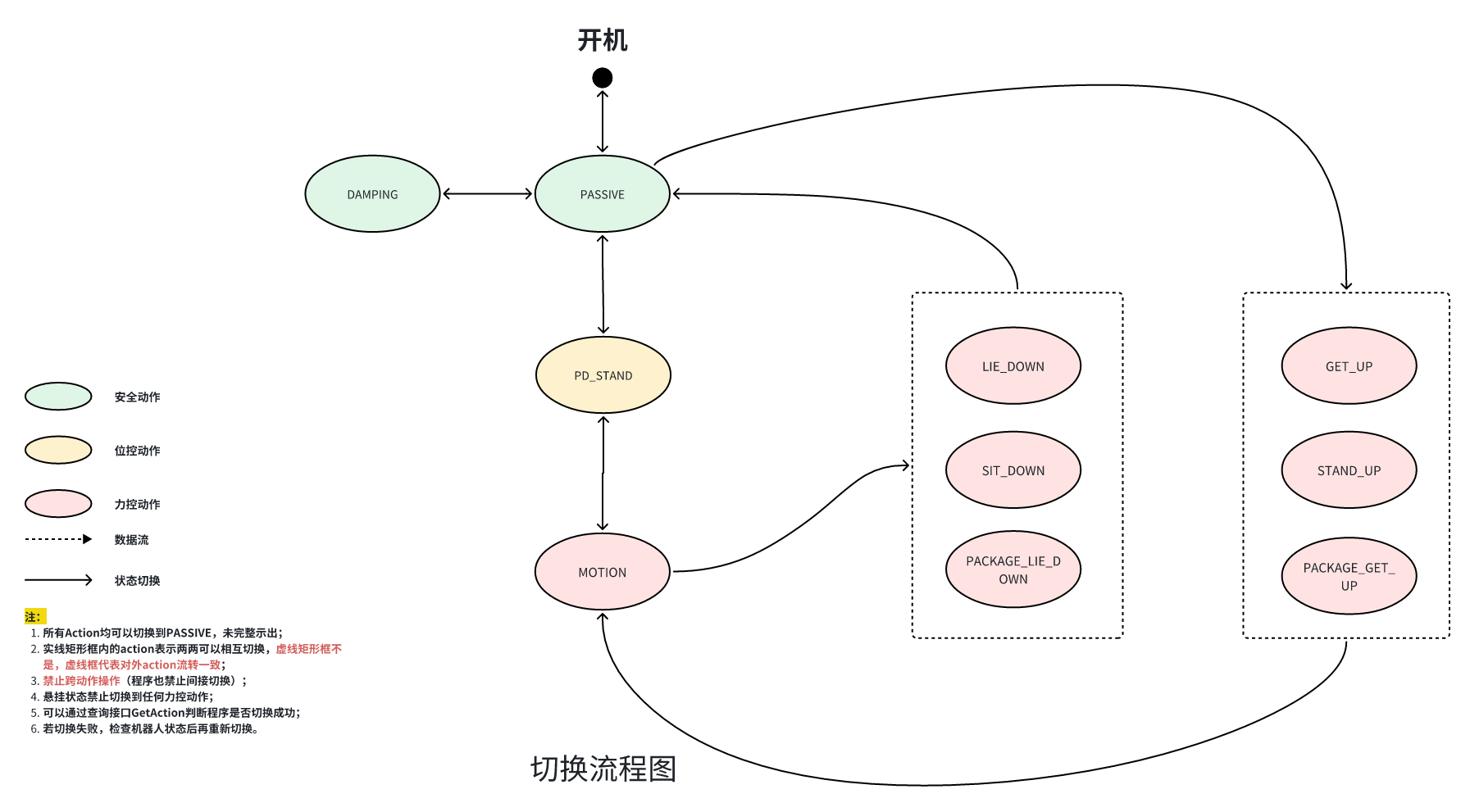
The AgiBot motion control program is designed with an internal state machine that switches between different models under different states. The state machine is shown below:
The states are described as follows:
Action Type
Action Code
Name
Description
Available Control Interfaces
Safety Action
PASSIVE
Default Mode
The default action after motion control starts
Safety Action
DAMPING
Damping Mode
The joints can still be moved, but they have high damping and can be held in place
Position-Control Action
PD_STAND
Position-Control Stand Mode
The robot stands in position-control mode and initializes its joints before entering force-control mode
Force-Control Action
MOTION
Motion Mode
In this mode, the robot can walk, perform upper-body motions, dance, and more
/motion/control/arm_joint_command
Force-Control Action
SIT_DOWN
Sit-Down Mode
Used together with the STAND_UP mode
Force-Control Action
STAND_UP
Stand-Up Mode
Used together with the SIT_DOWN mode
Force-Control Action
LIE_DOWN
Lie-Down Mode
Used together with the GET_UP mode
Force-Control Action
GET_UP
Get-Up Mode
Used together with the LIE_DOWN mode
Force-Control Action
PACKAGE_LIE_DOWN
Packing-Box Lie-Down Mode
Used together with the PACKAGE_GET_UP mode
Force-Control Action
PACKAGE_GET_UP
Packing-Box Get-Up Mode
Used together with the PACKAGE_LIE_DOWN mode
In general, switching states other than force-control states programmatically is not recommended. Programmatic switching is recommended only among force-control states. Other transitions involve operations such as lifting or lowering the robot and should only be performed manually.
Control interfaces generally have Action requirements. Interfaces without explicitly stated Action requirements, as well as query interfaces, generally have no Action restrictions.
Except for walking control commands, the robot's other joint-control topic interfaces are occupied by the motion_player module by default. Stop the motion_player module before sending joint-control commands. The commands are as follows:
This is an asynchronous interface. Completion of the call does not mean the switch has completed. Use the GetAction interface to check whether the switch is complete.
MotionControl_LocomotionMode_DEFAULT is the default mode
MotionControl_LocomotionMode_NAVIGATION is navigation mode
forward_velocity: Forward velocity scale factor. The sent scale factor ranges from -1.0 to 1.0. `+` means forward and `-` means backward. The actual speed is calculated by `mc`.
lateral_velocity: Lateral velocity scale factor. The sent scale factor ranges from -1.0 to 1.0. `+` means moving left and `-` means moving right. The actual speed is calculated by `mc`.
angular_velocity: Angular velocity scale factor. The sent scale factor ranges from -1.0 to 1.0. `+` means rotating left and `-` means rotating right. The actual speed is calculated by `mc`.
Example Script
examples/mc/walk.py
Notes
The ROS2 message type is `ros2_plugin_proto/msg/RosMsgWrapper`. Run `source prebuilt/ros2_plugin_proto_aarch64/share/ros2_plugin_proto/local_setup.bash` before using it.
This interface has invocation restrictions and can only be called in the MOTION state.
name: Joint names. Must be fixed as ["left_shoulder_pitch_joint","left_shoulder_roll_joint","left_shoulder_yaw_joint",
"left_elbow_joint",
"left_wrist_roll_joint",
"left_wrist_pitch_joint",
"left_wrist_yaw_joint",
"right_shoulder_pitch_joint",
"right_shoulder_roll_joint",
"right_shoulder_yaw_joint",
"right_elbow_joint",
"right_wrist_roll_joint",
"right_wrist_pitch_joint",
"right_wrist_yaw_joint"]
position: Joint angles. You must fill in the angle values of all 14 joints.
velocity: Invalid field. Set it to 0.0.
effort: Invalid field. Set it to 0.0.
Example Script
examples/mc/arm.py
Notes
It is recommended to call this interface at 100 Hz. Make sure the interval between adjacent commands does not exceed 30 ms, the speed does not exceed 4 rad/s, and the commands remain as smooth as possible. Otherwise, jitter may occur. At a minimum, a basic low-pass filter is recommended: `y(k) = (1 - a) * y(k - 1) + a * x(k)`.
The angle limits are as follows (unit: rad)
left_shoulder_pitch_joint: ±2.967
left_shoulder_roll_joint: ±1.588
left_shoulder_yaw_joint: ±2.793
left_elbow_joint: -1.047 ~ 2.444
left_wrist_roll_joint: ±0.576
left_wrist_pitch_joint: ±1.623
left_wrist_yaw_joint: ±2.793
right_shoulder_pitch_joint: ±2.967
right_shoulder_roll_joint: ±1.588
right_shoulder_yaw_joint: ±2.793
right_elbow_joint: -1.047 ~ 2.444
right_wrist_roll_joint: ±0.576
right_wrist_pitch_joint: ±1.623
right_wrist_yaw_joint: ±2.793
This interface has invocation restrictions and can only be called in the MOTION state.
Because the `motion_player` module continuously sends commands to the `motion_control` module, stop the `motion_player` module before sending commands.
double waist_pitch // range: [-0.5, 0.5] unit: rad double waist_roll // range: [-0.3, 0.3] unit: rad double waist_yaw // range: [-1.57, 1.57] unit: rad double waist_height // range: [-0.4, 0.0] unit: m
Example Script
examples/mc/move_waist.py
Notes
The ROS2 message type is `ros2_plugin_proto/msg/RosMsgWrapper`. Run `source prebuilt/ros2_plugin_proto_aarch64/share/ros2_plugin_proto/local_setup.bash` before using it.
Because the `motion_player` module continuously sends commands to the `motion_control` module, stop the `motion_player` module before sending commands.
name: Joint names. Must be fixed as ["head_yaw_joint", "head_pitch_joint"]
position: Joint angles. The first value represents the yaw degree of freedom, ranging from -0.9 to 0.9. The second value represents the pitch degree of freedom, ranging from -0.3 to 0.3.
velocity: Invalid field. Leave it empty.
effort: Invalid field. Leave it empty.
Example Script
examples/mc/neck.py
Notes
Note: this interface can only be called in the motion state.
position: Joint angles. The first value represents the yaw degree of freedom, ranging from -0.9 to 0.9. The second value represents the pitch degree of freedom, ranging from -0.3 to 0.3.
Example Script
examples/mc/joint_state.py
Notes
Because the `motion_player` module continuously sends commands to the `motion_control` module, stop the `motion_player` module before sending commands.