
5. Secondary Development Program Deployment
5. Secondary Development Program Deployment
Two deployment methods are generally recommended for secondary development programs: onboard HDU/ADU deployment and third-party industrial PC deployment. Onboard deployment is simpler in terms of hardware and is suitable when the secondary development program does not consume many resources. If more resources are required, some existing programs on the HDU or ADU need to be stopped to free CPU, GPU, and other resources. Third-party industrial PC deployment requires additional data transmission methods such as HTTP, but it allows the original onboard software functions to be retained while also providing relatively sufficient computing resources.
5.1 Onboard HDU and ADU Deployment
The recommended deployment directory is /agibot/data/home/agi/Desktop. The onboard disk cleanup module clears space periodically, but this directory is on the whitelist and will not be cleaned.
mkdir -p /agibot/data/home/agi/Desktop
If you encounter permission issues, you can create the directory with the following commands:
sudo mkdir -p /agibot/data/home/agi/Desktop
sudo chown -R agi:agi /agibot/data/home/agi
5.1.1 Python Virtual Environment
If you use Python for secondary development, you only need to create a virtual environment. Tools such as conda or venv can be used. venv is built into the system. For Conda installation, refer to the official Miniconda installation guide.
5.1.2 C++ Development and Deployment
When developing with C++ or another compiled language, programs for the x86_64 architecture must be compiled on a local x86_64 computer and then uploaded to the HDU or ADU. Programs for the arm64 architecture must be compiled in an arm64 development environment.
To compile arm64 programs on a local x86_64 computer, install an arm64 cross-compilation environment as follows.
- Install the cross-compilation toolchainbash
sudo apt install \ gcc-aarch64-linux-gnu \ g++-aarch64-linux-gnu \ binutils-aarch64-linux-gnu - Build the target device's
sysrootA3uon the local x86_64 computer to prevent header or library version mismatches.- Create a
sysrootA3udirectory in the project directory. - Copy
/lib,/usr/lib,/usr/include,/usr/local,/usr/share, and/opt/rosfrom the target device intosysrootA3u.bashscp -r agi@172.23.20.140:/lib sysrootA3u/ scp -r agi@172.23.20.140:/usr/lib sysrootA3u/ scp -r agi@172.23.20.140:/usr/include sysrootA3u/ scp -r agi@172.23.20.140:/usr/local sysrootA3u/ scp -r agi@172.23.20.140:/usr/share sysrootA3u/ scp -r agi@172.23.20.140:/opt/ros sysrootA3u/ - Download the third-party dependencies required by the target device.
- Create a
- The following
wake_upprogram demonstrates cross-compilation on a local x86_64 computer.- Create the project structuretext
temp/ ├── build-a3u/ │ └── wakeup_subscriber ├── prebuilt/ │ ├── sysrootA3u/ │ ├── lib/ │ │ │ ├── opt/ │ │ └── ros/ │ └── usr/ │ ├── include/ │ ├── lib/ │ ├── local/ │ └── share/ │ ├── CMakeLists.txt ├── main.cpp └── start_wakeup_subscriber.sh - Install dependencies
The program depends on the protobuf development library. The copiedsysrootA3ucontains only the runtime library. Download the development package from:
https://deb.debian.org/debian/pool/main/p/protobuf/libprotobuf-dev_3.21.12-3+deb12u1_amd64.deb
Extract it into the specifiedsysrootA3udirectory without installing it on the host system:bashdpkg-deb -x libprotobuf-dev_3.21.12-3+deb12u1_amd64.deb /agibot/data/home/agi/Desktop/temp/sysrootA3u wake_updemo programcpp#include <cstdint> #include <limits> #include <memory> #include <string> #include <google/protobuf/util/json_util.h> #include <rclcpp/rclcpp.hpp> #include <ros2_plugin_proto/msg/ros_msg_wrapper.hpp> #include "aimdk/protocol/agent/agent_data.pb.h" namespace { constexpr char kTopic[] = "/agent/wakeup/pb_3Aaimdk_2Eprotocol_2EWakeUpResult"; } class WakeUpSubscriber final : public rclcpp::Node { public: WakeUpSubscriber() : Node("wakeup_result_subscriber") { const auto qos = rclcpp::QoS(rclcpp::KeepLast(10)) .reliable() .durability_volatile(); subscription_ = create_subscription<ros2_plugin_proto::msg::RosMsgWrapper>( kTopic, qos, [this]( const ros2_plugin_proto::msg::RosMsgWrapper::ConstSharedPtr msg) { wakeup_callback(msg); }); RCLCPP_INFO(get_logger(), "Started subscribing to WakeUpResult: %s", kTopic); } private: void wakeup_callback( const ros2_plugin_proto::msg::RosMsgWrapper::ConstSharedPtr &msg) { if (msg->serialization_type != "pb") { RCLCPP_WARN( get_logger(), "Unsupported serialization type received: %s", msg->serialization_type.c_str()); return; } if (msg->data.size() > static_cast<std::size_t>(std::numeric_limits<int>::max())) { RCLCPP_ERROR(get_logger(), "WakeUpResult data exceeds the parsing limit"); return; } aimdk::protocol::WakeUpResult wakeup_result; if (!wakeup_result.ParseFromArray( msg->data.data(), static_cast<int>(msg->data.size()))) { RCLCPP_ERROR(get_logger(), "Failed to parse WakeUpResult data"); return; } google::protobuf::util::JsonPrintOptions options; options.add_whitespace = true; options.preserve_proto_field_names = true; std::string json; const auto status = google::protobuf::util::MessageToJsonString( wakeup_result, &json, options); if (!status.ok()) { RCLCPP_ERROR( get_logger(), "Failed to convert WakeUpResult to JSON: %s", status.ToString().c_str()); return; } RCLCPP_INFO(get_logger(), "WakeUpResult: %s", json.c_str()); } rclcpp::Subscription< ros2_plugin_proto::msg::RosMsgWrapper>::SharedPtr subscription_; }; int main(int argc, char *argv[]) { rclcpp::init(argc, argv); const auto node = std::make_shared<WakeUpSubscriber>(); RCLCPP_INFO( node->get_logger(), "Listening for WakeUpResult. Press Ctrl+C to exit..."); rclcpp::spin(node); RCLCPP_INFO(node->get_logger(), "Exiting..."); rclcpp::shutdown(); return 0; }CMakeLists.txtcmakecmake_minimum_required(VERSION 3.22) # The cross-compiler must run on the x86 host. Do not use an ARM64 compiler wrapper from the sysroot. set(CMAKE_SYSTEM_NAME Linux) set(CMAKE_SYSTEM_PROCESSOR aarch64) set(CMAKE_C_COMPILER /usr/bin/aarch64-linux-gnu-gcc) set(CMAKE_CXX_COMPILER /usr/bin/aarch64-linux-gnu-g++) project(wakeup_subscriber LANGUAGES CXX) set(CMAKE_CXX_STANDARD 17) set(CMAKE_CXX_STANDARD_REQUIRED ON) set(CMAKE_CXX_EXTENSIONS OFF) set(PROJECT_ROOT "${CMAKE_CURRENT_SOURCE_DIR}") set(SYSROOT "${PROJECT_ROOT}/sysrootA3u") set(AARCH64_PREBUILT "${PROJECT_ROOT}/prebuilt/ros2_plugin_proto_aarch64") set(AARCH64_TRIPLE "aarch64-linux-gnu") set(CMAKE_SYSROOT "${SYSROOT}") set(CMAKE_FIND_ROOT_PATH "${AARCH64_PREBUILT}" "${SYSROOT}" ) set(CMAKE_FIND_ROOT_PATH_MODE_PROGRAM NEVER) set(CMAKE_FIND_ROOT_PATH_MODE_LIBRARY ONLY) set(CMAKE_FIND_ROOT_PATH_MODE_INCLUDE ONLY) set(CMAKE_FIND_ROOT_PATH_MODE_PACKAGE ONLY) list(PREPEND CMAKE_PREFIX_PATH "${SYSROOT}/opt/ros/jazzy" "${AARCH64_PREBUILT}" ) find_package(ament_cmake REQUIRED) find_package(rclcpp REQUIRED) find_package(ros2_plugin_proto REQUIRED) set(Protobuf_INCLUDE_DIR "${SYSROOT}/usr/include") set(Protobuf_LIBRARY "${SYSROOT}/usr/lib/${AARCH64_TRIPLE}/libprotobuf.so.32") find_package(Protobuf 3.21.12 REQUIRED) add_executable(wakeup_subscriber main.cpp "${PROJECT_ROOT}/prebuilt/generated/aimdk/protocol/agent/agent_data.pb.cc" "${PROJECT_ROOT}/prebuilt/generated/aimdk/protocol/common/control_source.pb.cc" "${PROJECT_ROOT}/prebuilt/generated/aimdk/protocol/common/header.pb.cc" "${PROJECT_ROOT}/prebuilt/generated/aimdk/protocol/common/rpc.pb.cc" "${PROJECT_ROOT}/prebuilt/generated/aimdk/protocol/common/timestamp.pb.cc" ) target_include_directories(wakeup_subscriber SYSTEM PRIVATE "${SYSROOT}/usr/include/${AARCH64_TRIPLE}" ) target_include_directories(wakeup_subscriber PRIVATE "${PROJECT_ROOT}/prebuilt/generated" "${AARCH64_PREBUILT}/include" ) target_link_libraries(wakeup_subscriber PRIVATE protobuf::libprotobuf rclcpp::rclcpp ros2_plugin_proto::ros2_plugin_proto__rosidl_typesupport_cpp ) set_target_properties(wakeup_subscriber PROPERTIES BUILD_RPATH "${AARCH64_PREBUILT}/lib;${SYSROOT}/opt/ros/jazzy/lib;${SYSROOT}/usr/lib/${AARCH64_TRIPLE};${SYSROOT}/lib/${AARCH64_TRIPLE}" INSTALL_RPATH "$ORIGIN/../lib" ) install(TARGETS wakeup_subscriber DESTINATION bin )- Compile the programbash
cmake -S . -B build -DCMAKE_BUILD_TYPE=Release cmake --build build -j"$(nproc)" - Run the program
The program depends on libraries underprebuilt/audio_msgs_proto_aarch64/lib. Run it with the following commands:bashsource /agibot/software/v0/entry/env/env.sh source /agibot/data/home/agi/Desktop/prebuilt/ros2_plugin_proto_aarch64/share/ros2_plugin_proto/local_setup.bash ./build-a3u/wakeup_subscriber
- Create the project structure
5.2 Wired Connection to the Robot Device
Regular Peripheral Connection
There is a Type-C interface on the robot head connected to the HDU device for communication with the HDU. Users can connect the Type-C interface on the robot head to other devices to communicate with the HDU.
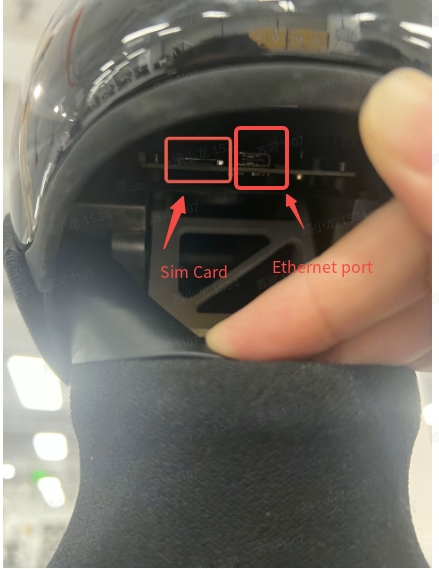
Third-Party Industrial PC Connection
If you need to perform ROS2 communication while connecting to the robot through a wired connection, follow the steps below:
First, connect the third-party industrial PC to the Ethernet port in the robot's rear debugging compartment, and set the PC network segment to 10.42.10.x. Then copy /agibot/software/v0/entry/cfg/ros_dds_configuration.xml from the HDU to the local computer. Before running any ROS2 program or using ros2 commands on the local computer, execute the following commands (/path/to should be replaced with the actual path):
export ROS_DOMAIN_ID=232
export FASTRTPS_DEFAULT_PROFILES_FILE=/path/to/ros_dds_configuration.xml